
LanGuard
Wi-Fi off when you're wired. Back on when you're not.
A tiny menu-bar app that turns Wi-Fi off the moment a wired link goes up, and back on when you unplug. Edge-based, wake-aware, per-interface — and it can keep your connections alive across the switch.
brew install --cask roypadina/tap/languard Version 1.1.9, released 23 October 2026. macOS 14 or later, Apple Silicon and Intel. Free and MIT licensed.
See it work
Plug in: the indicator flips to LAN and Wi-Fi powers off. Unplug: back to Wi-Fi.
Why LanGuard
It only acts on the edge
LanGuard reacts to the moment you plug in or unplug, and to nothing else. Turn Wi-Fi back on while docked and it stays on until the next unplug. A transition that happened while the Mac slept is caught on wake, without the false toggles a sleeping dock used to cause.
Your connections survive the switch
With Connection Protection on, a stable address moves between LAN and Wi-Fi, so downloads, VPNs and agent sessions carry on. Press ⌃⌥⌘L before you unplug and LanGuard moves traffic to Wi-Fi first, then tells you it is safe to pull the cable.
Small, native, honest
A 2 MB download built on CoreWLAN and SystemConfiguration. You choose which adapters count; VPN, VM and bridge adapters are ignored by default so they cannot pin Wi-Fi off. No admin rights unless you turn protection on, and no network calls of its own.
How it works
Three rules, and the third one is what makes it feel right.
macOS keeps Wi-Fi on even when you are docked over Ethernet: a second IP lease, a second default route, sometimes traffic leaving on the wrong interface, and a radio left on for nothing. LanGuard watches link state through SystemConfiguration and switches Wi-Fi power through CoreWLAN, the same APIs the system uses. The last wired state is remembered, so a cable pulled while the Mac was asleep still counts as an unplug on wake.
Connection Protection is optional and off by default. A TCP connection is pinned to the address it started on, so a normal unplug drops everything that was open over the LAN. With protection on, LanGuard keeps one extra address that it moves to whichever link is active, plus two routes that send traffic through it. Nothing persists: a reboot, the panic item in the menu, or the protection switch puts the network back to stock. It works on networks where LAN and Wi-Fi share a router, IPv4 only, and it is not for full-tunnel VPNs.
How it compares
| LanGuard | BridgeChecker | ToggleWifi | |
|---|---|---|---|
| Price | Free | Paid | Free |
| Open source | MIT | No | Yes |
| Per-interface selection | Yes | Yes | No |
| Respects a manual Wi-Fi toggle | Yes | Not documented | Not documented |
| Handles sleep and wake | Yes | Not documented | Not documented |
| Keeps connections alive on switch | Yes | No | No |
| Admin rights | Not by default | Not documented | Required |
Based on each project's public documentation at the time of writing. Check their sites for current details.
In the menu bar and in Settings

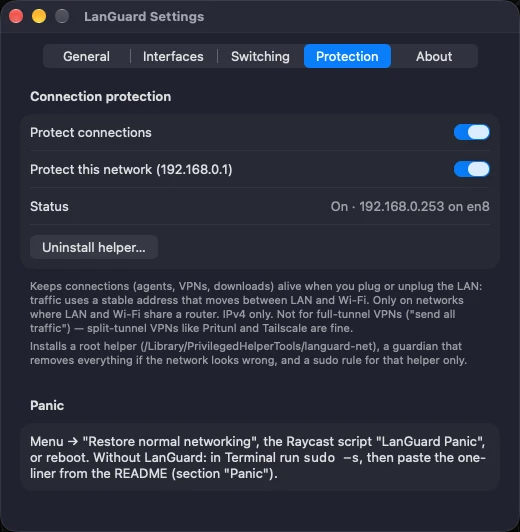
In Settings you can
- choose which wired adapters count as triggers (real adapters on by default, virtual ones off)
- choose which Wi-Fi adapters are controlled
- switch each banner and popup on or off
- record your own Switch to Wi-Fi shortcut
- turn on Connection Protection, per network
- pick the menu-bar indicator style and start at login
Requirements
- macOS 14 or laterSonoma onwards.
- Apple Silicon and IntelOne universal download, about 2 MB.
- No admin by defaultConnection Protection is the one feature that installs a small root helper, after a single password prompt.
- No network calls of its ownOpen source under MIT. Read it, build it, or verify the release SHA-256.
First launch
LanGuard is not notarized by Apple, which needs a paid developer account (it is ad-hoc signed). So macOS blocks the first launch with a "could not verify" message. Open System Settings > Privacy & Security, scroll down and click Open Anyway. Or clear the quarantine flag once:
xattr -dr com.apple.quarantine "/Applications/LanGuard.app" After that it opens like any other app. If you would rather not trust a download, build it from source.
Questions
Wi-Fi turned back on by itself while I was docked. Bug?
No. LanGuard acts only at the moment you plug or unplug. If you, or another app, turned Wi-Fi on while wired, LanGuard respects that until your next unplug and replug.
I am docked, but Wi-Fi stayed on.
Either you turned it on by hand since plugging in, or that wired adapter is not selected as a trigger in Settings. Virtual adapters are off by default. Also: a LAN that cannot reach the internet never turns Wi-Fi off.
Does it work with USB-C and Thunderbolt docks, or USB Ethernet adapters?
Yes. Any adapter macOS reports as Ethernet works, and you choose which ones count.
Does it need admin rights?
Not for toggling Wi-Fi: that goes through CoreWLAN and SystemConfiguration as your normal user. Connection Protection is the one optional feature that installs a root helper, with a single password prompt, and you can remove it from Settings.
macOS says it could not verify the developer.
LanGuard is not notarized yet. Click Open Anyway under System Settings > Privacy & Security, or run the xattr line under First launch. Notarization needs the Apple Developer Program, which is what a coffee goes toward.
Keep the next one coming
If LanGuard keeps your Wi-Fi and wired connection from fighting each other, you can support its development. Optional, always appreciated.
I'm a software engineer from Israel who builds small, focused Mac tools to fix the little annoyances in my own day — then shares them free and open source. If this app saves you time, a coffee on Ko-fi keeps the next one coming. ☕
Roy Padina
Not today? A star on GitHub or a bug report helps too.
What a coffee pays for
- The Apple Developer Program, so the apps can be notarized and the "Open Anyway" step goes away.
- Evenings on bug reports, new macOS versions and Intel builds.
- The next small tool.