
MaccyPlus
Maccy, plus automation: rules, hotkeys, plugins and a CLI for AI agents.
The Maccy clipboard manager, plus automation. Rules act on what you copy (open, search, transform, run a Shortcut), each action gets its own hotkey or runs on copy, plugins add more without a rebuild, and a CLI lets AI agents leave values in your history.
brew install --cask roypadina/tap/maccyplus Version 2.8.3, released 23 October 2026. macOS 14 or later, Apple Silicon and Intel. Free and MIT licensed.
Why MaccyPlus
Everything Maccy does
A searchable clipboard history that is fast, keyboard-first and private. MaccyPlus is a fork that tracks upstream Maccy and syncs with its releases, so nothing you already rely on changes.
Rules that act on what you copy
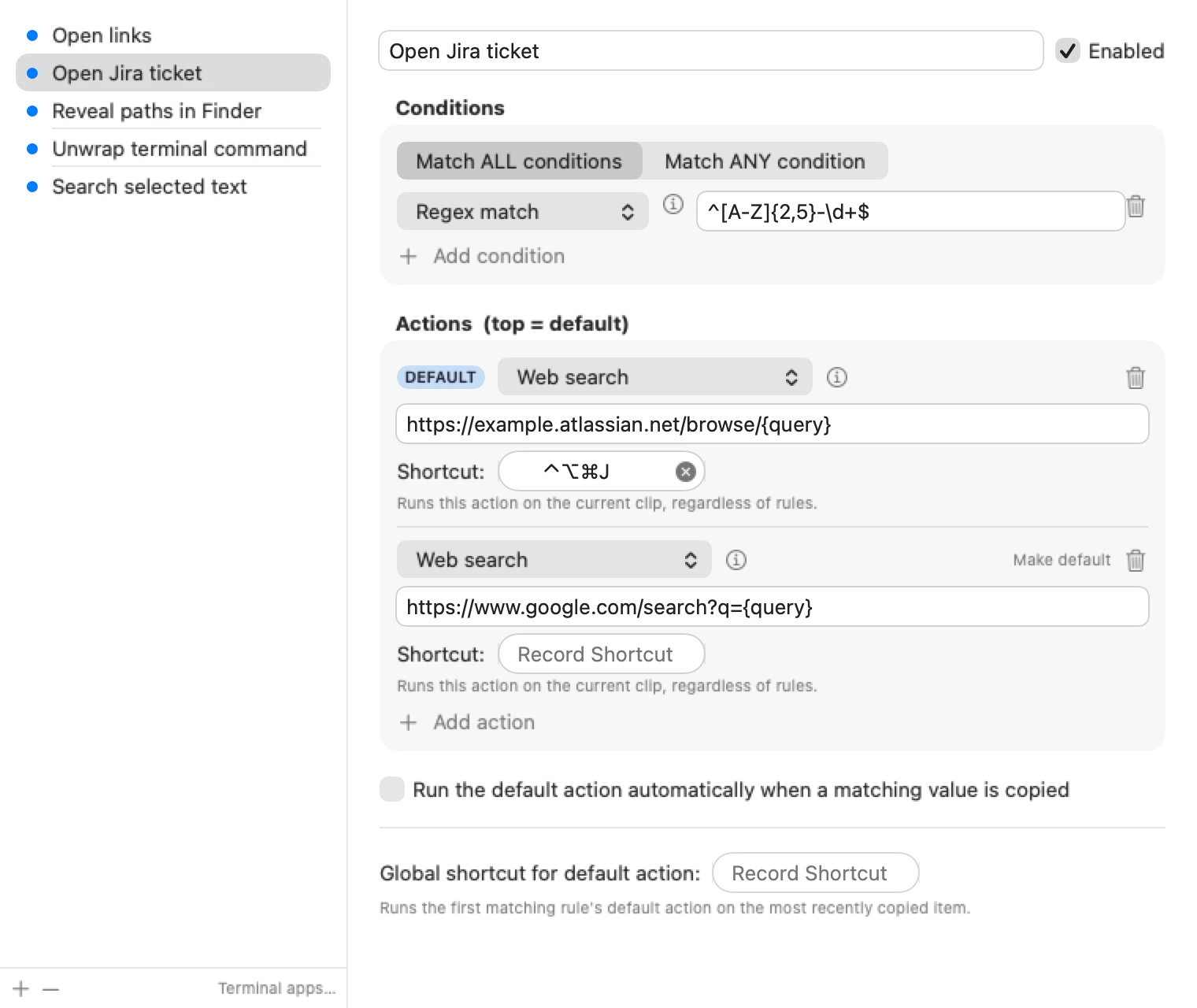
A rule matches a copy by kind, text, regex, source app, file or folder: a URL, an email, an issue key, a soft-wrapped terminal command. Its actions open it in an app, search the web with any URL template, reveal it in Finder, transform the text, or run a macOS Shortcut. Each action can have its own global hotkey, or run the moment you copy.
Plugins, and a door for agents
Add conditions and actions as declarative or JavaScript plugins, from a marketplace or a folder, without rebuilding the app. A command-line API lets scripts and AI agents read your history and leave values in it, so an agent can hand you a token or a path through the clipboard you already use.
How it works
Copy something, and MaccyPlus looks at it.
Conditions and actions are small providers, eleven built in and more from plugins. A declarative plugin is a folder with a manifest; a JavaScript plugin is a text transform or a condition and has no network access and cannot open URLs, which is what keeps the plugin model safe. The command line edits rules and actions in the running app, and MaccyPlus history reads and writes entries, which is the whole agent API.
Plugins live in their own repository, MaccyPlus-Plugins: one folder per plugin, installed from inside the app, and a starting point if you want to write your own.
What MaccyPlus adds over Maccy
| Maccy | MaccyPlus | |
|---|---|---|
| Searchable clipboard history, keyboard-first, private | Yes | Yes |
| Rules: match a copy by kind, regex, text, source app, file or folder | No | Yes |
| Actions: open in an app, web search, reveal in Finder, transform, run a Shortcut | No | Yes |
| Per-action global shortcuts, auto-run on copy | No | Yes |
| Plugins, declarative or JavaScript | No | Yes |
| Agent clipboard API (MaccyPlus history …) | No | Yes |
Maccy is by Alex Rodionov and contributors; MaccyPlus keeps its MIT license and credits.
Rules, actions and plugins

Out of the box
- conditions: contains text, regex match, is a URL, an email, a file or folder, from a given app, and more
- actions: open as URL, open in an app, open file, reveal in Finder, web search, text transforms, run a Shortcut
- bundled plugins such as Has URL, Shout and Text transforms
- more in the MaccyPlus-Plugins repository
- a Claude Code plugin, maccyplus-clipboard, so an agent can leave values in your history
Requirements
- macOS 14 or laterSonoma onwards.
- Apple Silicon and IntelOne universal download.
- Accessibility, for pasteNeeded to paste into the frontmost app when you pick an item. Without it, selecting an item copies but does not paste.
- No network for the app itselfJavaScript plugins have no network access. Only the plugin marketplace fetches remote data. No analytics.
First launch
MaccyPlus is not notarized by Apple, which needs a paid developer account (it is ad-hoc signed). So macOS blocks the first launch with a "could not verify" message. Open System Settings > Privacy & Security, scroll down and click Open Anyway. Or clear the quarantine flag once:
xattr -dr com.apple.quarantine "/Applications/MaccyPlus.app" After that it opens like any other app. If you would rather not trust a download, build it from source.
Questions
How is this different from Maccy?
MaccyPlus adds rules, actions, per-action hotkeys, plugins and a command-line API on top of Maccy, and tracks upstream releases. If you only want the history, Maccy itself is the right pick.
It does not paste when I select an item.
Turn on "Paste automatically" in Preferences, and add MaccyPlus under System Settings > Privacy & Security > Accessibility.
Can a plugin open a URL or call the network?
No. Plugins are text transforms and conditions, with no network access. Opening things is done by the built-in actions (open as URL, open in app, web search), which a rule can combine with a plugin condition.
Can I keep a password manager out of the history?
Yes. Add its custom pasteboard type under Preferences > Ignore; Universal Clipboard copies can be ignored the same way with com.apple.is-remote-clipboard.
Can I script it?
Yes. The command line creates, lists and edits rules and actions in the running app, and MaccyPlus history is how scripts and agents read or add entries.
Keep the next one coming
If MaccyPlus turns the things you copy into things that happen, you can support its development. Optional, always appreciated.
I'm a software engineer from Israel who builds small, focused Mac tools to fix the little annoyances in my own day — then shares them free and open source. If this app saves you time, a coffee on Ko-fi keeps the next one coming. ☕
Roy Padina
Not today? A star on GitHub or a bug report helps too.
What a coffee pays for
- The Apple Developer Program, so the apps can be notarized and the "Open Anyway" step goes away.
- Evenings on bug reports, new macOS versions and Intel builds.
- The next small tool.