MeetAlert
Meeting alerts you can't miss: a popup that stays, a phone push that escalates.
A popup that stays until you act, with a live countdown and one-tap Join for Zoom, Meet, Teams and Webex. Away from the Mac? A phone push that escalates until you acknowledge it. Reads every macOS calendar with no API setup.
brew install --cask roypadina/tap/meetalert Version 1.5.7, released 23 October 2026. macOS 14 or later, Apple Silicon and Intel. Free and MIT licensed.
Why MeetAlert
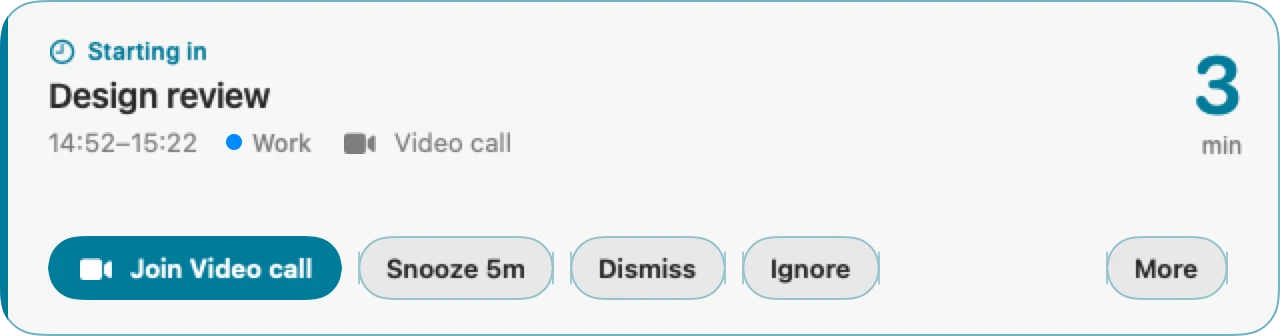
A popup that will not go away
It stays on screen until you act, on whichever display your mouse is on. A large countdown ticks from minutes to seconds to how late you are, and the whole card shifts from cyan to amber to red. The state is always spelled out in words and icons too, never colour alone.
Your phone, when you are not at the desk
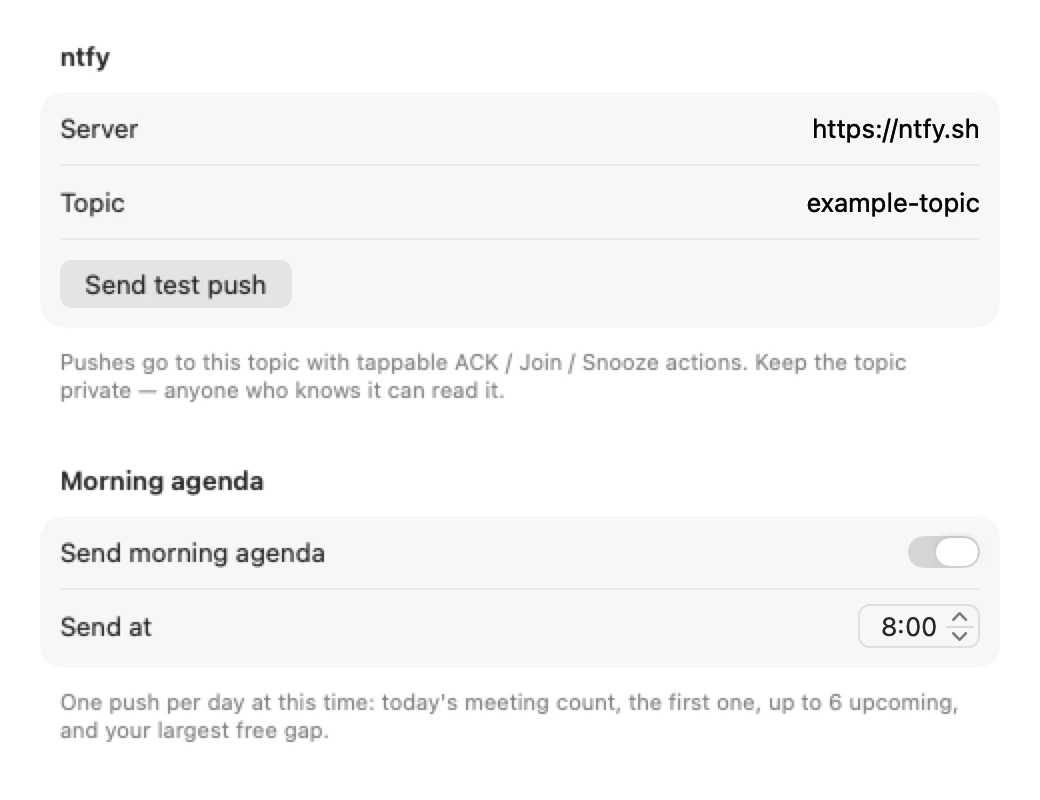
The same alert goes to your phone through ntfy, with tappable Acknowledge, Join and Snooze actions. If the Mac is idle or locked, the first push already goes out at urgent priority, and it repeats until you acknowledge or snooze, never past fifteen minutes after the start.
No calendar setup
It reads every calendar macOS already syncs, Google, iCloud, Exchange, CalDAV, with no API keys and no accounts to connect. Declined meetings are skipped. One-tap Join opens Zoom, Google Meet, Teams, Webex or Whereby straight from the alert.
How it works
One instrument, readable from across the room.
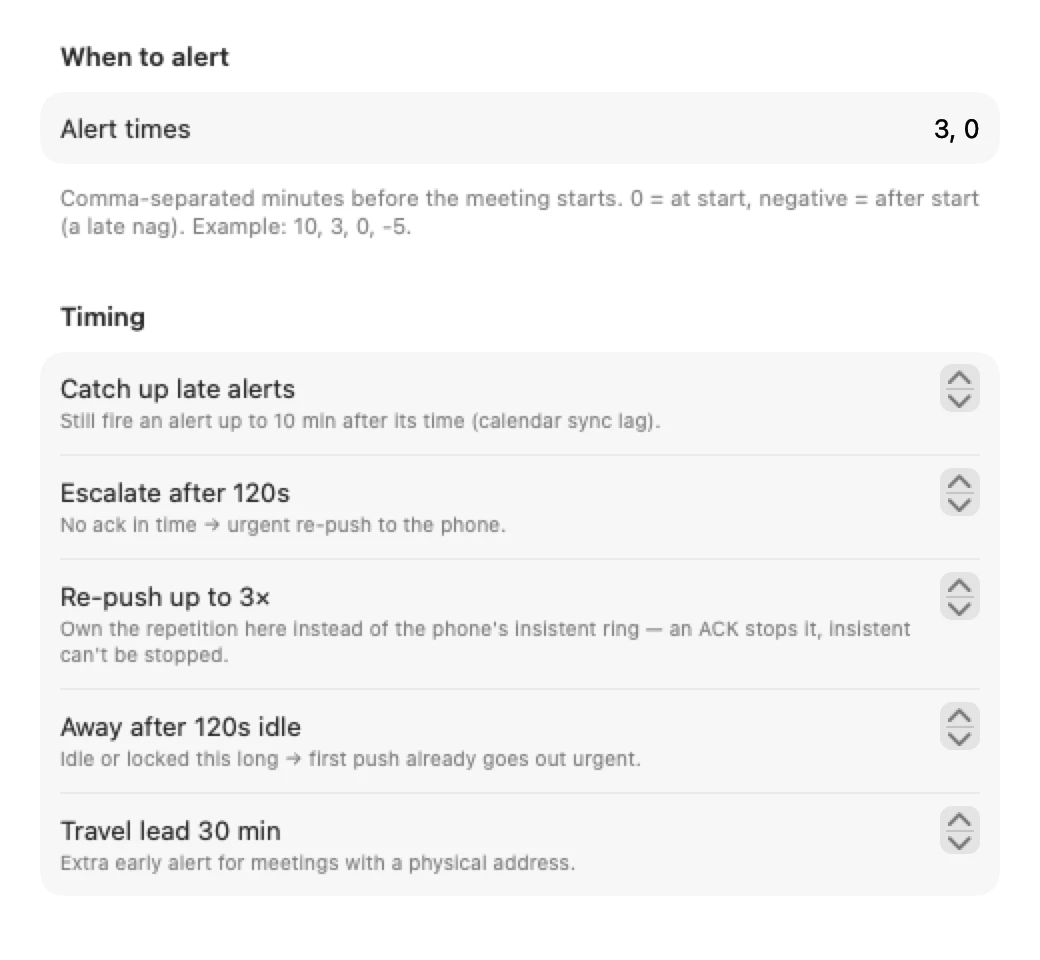
Each offset you configure, minutes before, at the start, or after as a late nag, opens its own alert, plus one travel-lead alert for meetings with a physical address. Several offsets coming due in one scan collapse into one popup instead of stacking. Click the card once (it never steals focus from what you are typing in) and the keys work: ↩ or J to join, 5 or 1 to snooze, ⌘D to dismiss, ⌘⇧I to ignore the series. The two final actions need a modifier on purpose, so ordinary typing can never kill an alert.
The menu bar shows a countdown to your next meeting, or the time left in the one you are in, and the icon itself carries the state: a plain calendar, a clock inside two hours, a badged clock inside three minutes, a filled clock while a meeting runs. An optional morning push lists today's meetings and your largest free gap.
The popup and the settings
Requirements
- macOS 14 or laterSonoma onwards.
- Apple Silicon and IntelOne universal download.
- Calendar accessAsked on first launch; without it MeetAlert cannot see your meetings. It also adds itself to Login Items once, on the very first launch only, and stays removed if you remove it.
- Phone push is optionalNeeds the free ntfy app and a topic of your own. No analytics, and no network calls besides that push.
First launch
MeetAlert is not notarized by Apple, which needs a paid developer account (it is ad-hoc signed). So macOS blocks the first launch with a "could not verify" message. Open System Settings > Privacy & Security, scroll down and click Open Anyway. Or clear the quarantine flag once:
xattr -dr com.apple.quarantine "/Applications/MeetAlert.app" After that it opens like any other app. If you would rather not trust a download, build it from source.
Questions
Does it work with Google Calendar?
Yes, and with anything else macOS syncs: iCloud, Exchange, CalDAV. Add the account under System Settings > Internet Accounts, tick the calendar in MeetAlert's settings, done. For new invites to show up quickly, set Calendar.app to refresh every minute.
No alert fired for a meeting I know exists.
Check, in order: is its calendar ticked in Settings; is it inside an alert window yet; has macOS's calendar cache synced it; does a keyword filter or the ignore list catch it; is it all-day (ignored by default); did you decline it (always skipped).
The first phone push came in at urgent priority.
Expected: the Mac was idle past the away threshold or the screen was locked, so MeetAlert assumed nobody would see the popup and skipped the grace window. Raise the away threshold in Settings if it fires too eagerly.
Why did escalation stop after three pushes?
By design. It repeats at most the configured number of times (three by default) and never continues past fifteen minutes after the meeting's start, so a meeting you are already in stops ringing.
Can I use my own ntfy server?
Yes. Set the server and topic under Settings > Phone. On a self-hosted server, keep the cache duration long enough for acknowledgements to be seen.
Keep the next one coming
If MeetAlert means you have not missed a meeting since, you can support its development. Optional, always appreciated.
I'm a software engineer from Israel who builds small, focused Mac tools to fix the little annoyances in my own day — then shares them free and open source. If this app saves you time, a coffee on Ko-fi keeps the next one coming. ☕
Roy Padina
Not today? A star on GitHub or a bug report helps too.
What a coffee pays for
- The Apple Developer Program, so the apps can be notarized and the "Open Anyway" step goes away.
- Evenings on bug reports, new macOS versions and Intel builds.
- The next small tool.