
NtfyBar
ntfy notifications on your Mac: popups that stay, rules, commands, plugins.
A native menu-bar client for ntfy. Subscribe to topics on ntfy.sh or your own server, keep a searchable history, and let each topic decide what happens: a notification, a popup that stays until you act, a copy to the clipboard, a shell command, or rules and sandboxed plugins.
brew install --cask roypadina/tap/ntfybar Version 1.1.1, released 24 October 2026. macOS 14 or later, Apple Silicon and Intel. Free and MIT licensed.
Why NtfyBar
Popups that do not get missed
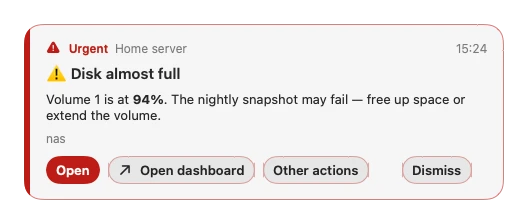
ntfy lets any script, server or service send you a push with one HTTP request. NtfyBar puts those messages on your Mac: popups float above your windows without stealing focus, stack neatly, show priority as colour, icon and word, render markdown, and carry the message's own buttons. Urgent ones stay until you dismiss them.
Each topic decides what happens
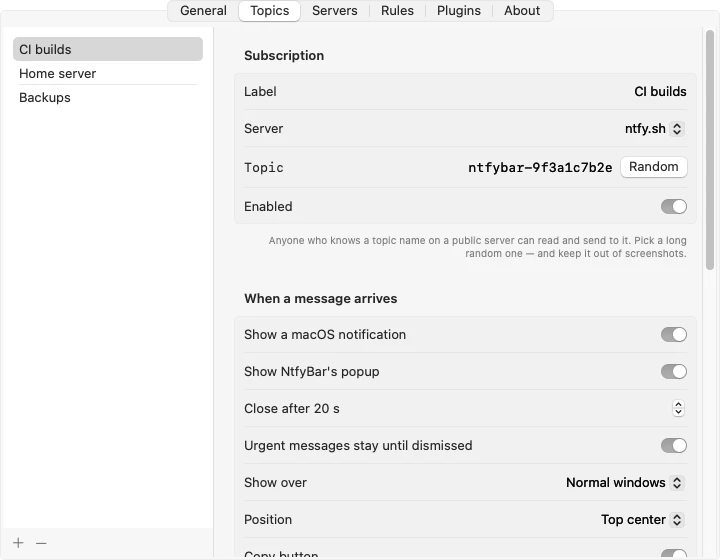
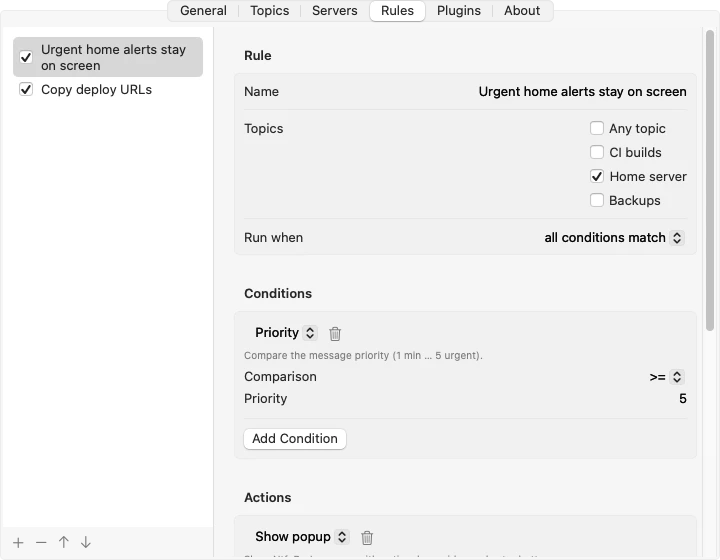
A macOS notification, an NtfyBar popup, a copy to the clipboard, a shell command, or any combination. Rules go further: conditions on priority, text, tags or JSON, and actions such as open a URL, run a Shortcut, publish a reply or play a sound. Messages sent while the Mac slept are fetched and summed up in one notice, not a flood.
Plugins in a sandbox
JavaScript conditions, actions and popups from the NtfyBar-Plugins marketplace or a local folder. A plugin sees only the message that triggered it, asks for each permission with a reason, and can never run commands, use the network, read your clipboard or files, change settings or subscribe to topics.
How it works
Subscribe, decide, act.
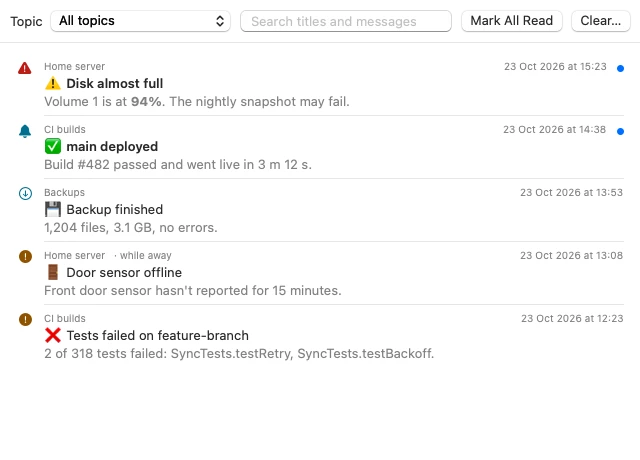
NtfyBar streams your topics live from ntfy.sh or any server you add, with username, password or access-token sign-in, and reconnects on its own. Every message lands in a searchable history, per topic, with read and unread. Pause notifications for 15 minutes, an hour or until you resume; quiet hours silence anything NtfyBar itself sends.
A command runs with /bin/zsh in your home folder and gets the message through environment variables and stdin, never pasted into the command line, because anyone who can post to your topic controls that text. Commands time out after 30 seconds and run one at a time per topic.
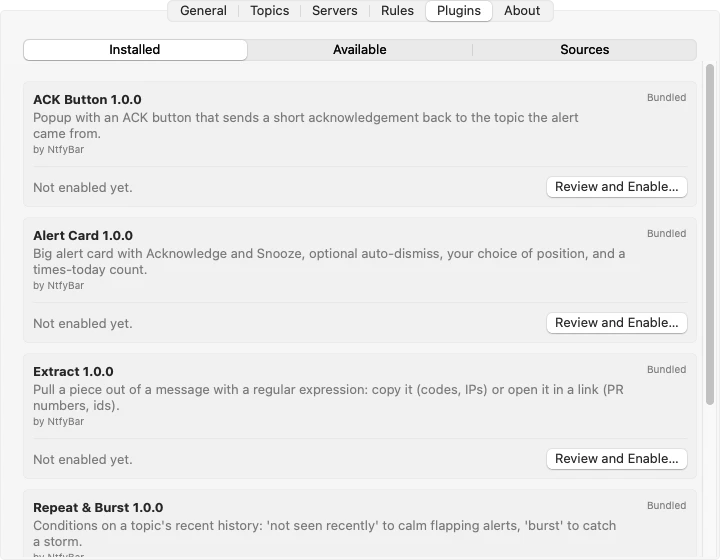
Plugins live in their own repository, NtfyBar-Plugins: the marketplace NtfyBar refreshes from, with every file checked against a published SHA-256 before anything is written, and an authoring guide if you want to write your own. Five ship inside NtfyBar, off until you enable them: Alert Card, a big card with Acknowledge and Snooze (the alert comes back later, even if NtfyBar was quit), auto-dismiss and your choice of position; Repeat & Burst, which calms flapping alerts or catches a storm; Extract, which copies a login code or opens a PR link it finds in a message; JSON Fields; and ACK Button, a popup that replies to the sender's topic. The marketplace adds examples such as Time Window and Reply Buttons.
Popups, topics, history

Requirements
- macOS 14 or laterSonoma onwards.
- Apple Silicon and IntelOne universal download.
- An ntfy topicOn ntfy.sh, free and without an account, or on a server you host. Topics are passwords on a public server: use long random names; Settings has a Random button.
- Notifications, and that is allAsked on first launch. Local network access is asked once for a server on your home network. No Accessibility, no Full Disk Access, no account, no telemetry, no update checks.
First launch
NtfyBar is not notarized by Apple, which needs a paid developer account (it is ad-hoc signed). So macOS blocks the first launch with a "could not verify" message. Open System Settings > Privacy & Security, scroll down and click Open Anyway. Or clear the quarantine flag once:
xattr -dr com.apple.quarantine "/Applications/NtfyBar.app" After that it opens like any other app. If you would rather not trust a download, build it from source.
Questions
What is ntfy?
A simple pub-sub notification service: curl -d "Backup done" ntfy.sh/your-topic and every subscriber of that topic gets a push. There is a free public server, phone apps, and you can host your own. NtfyBar is the Mac side of that; it is not affiliated with ntfy.
Does it work with my own server?
Yes. Add any number of servers under Settings > Servers, with username and password or an access token. macOS asks once about local network access for a server on your home network.
What does a plugin see?
Only the message that triggered it and that topic's label. Topic names and server addresses are hidden from it, best-effort, and every further ability (publishing, storage, opening links, reading earlier messages) is a permission you approve one by one and can switch off later.
Is message history encrypted?
No. Settings, rules and the history live in a folder readable only by you, but the history file is stored unencrypted. Topics and servers' credentials are in the config file there too.
What happens while my Mac is asleep?
Messages sent meanwhile are fetched on wake and summed up in one notification, as far back as the server still has them (12 hours on ntfy.sh).
Keep the next one coming
If NtfyBar is how your scripts and servers reach you now, you can support its development. Optional, always appreciated.
I'm a software engineer from Israel who builds small, focused Mac tools to fix the little annoyances in my own day — then shares them free and open source. If this app saves you time, a coffee on Ko-fi keeps the next one coming. ☕
Roy Padina
Not today? A star on GitHub or a bug report helps too.
What a coffee pays for
- The Apple Developer Program, so the apps can be notarized and the "Open Anyway" step goes away.
- Evenings on bug reports, new macOS versions and Intel builds.
- The next small tool.