
Obsidian Vault Git Watcher
Never leave a vault uncommitted again.
Waits until an Obsidian vault (or any git repo) goes quiet, then reminds you to commit and push: one click, a template message, snooze or skip, and a catch-up after the Mac wakes. Any number of vaults, each on its own schedule.
brew install --cask roypadina/tap/obsidian-vault-git-watcher Version 0.2.3, released 23 October 2026. macOS 14 or later, Apple Silicon and Intel. Free and MIT licensed.
Why Obsidian Vault Git Watcher
It waits until you are done
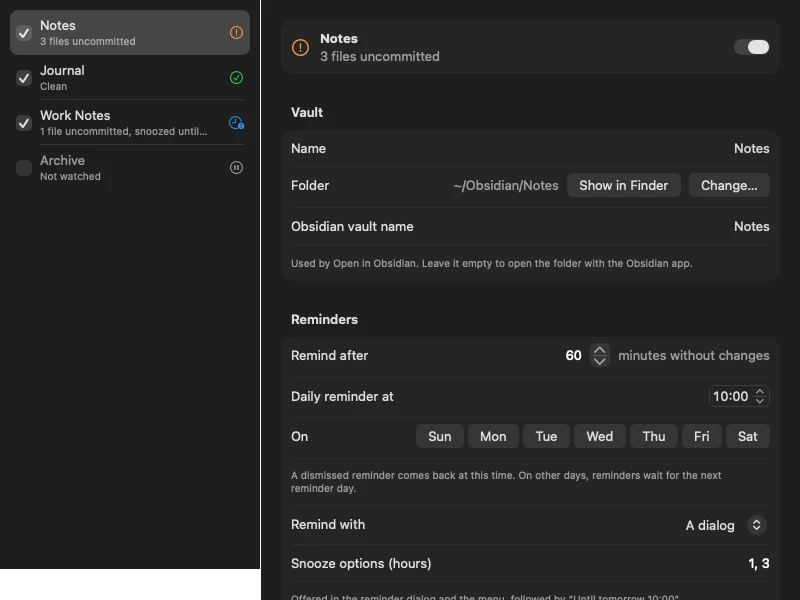
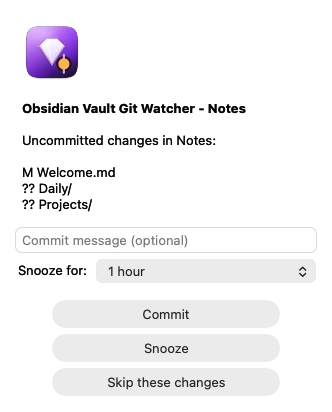
A reminder mid-edit is a nag. The app watches each vault and waits until it has been quiet for a while, an hour by default, then shows the changed files, a commit message field, and Commit, Snooze and Skip buttons. Dismiss it and the next one comes at your daily time; sleep through it and it shows up on wake.
Commit and push in one click
An empty message uses your template. A failed push is reported on its own: the commit still lands, the vault shows how many commits are not pushed, and the menu gets a Push item. Snooze for an hour or three, a custom number of hours, or until the next reminder; Skip ignores exactly this set of changes until something changes again.
Any number of vaults, any git repo
One menu bar icon shows the most urgent state across all your vaults; each has its own quiet period, reminder time and days, snooze options, template, ignored paths, remote and branch. Obsidian is the reason it exists, but it works with any git repository that has a remote.
How it works
Watch, wait, remind, commit.
File changes come from FSEvents and the timers are exact, so there is no polling and nothing to configure beyond the vault folder. The commit stages everything in the vault minus its ignored paths and .gitignore, or only files git already tracks if you prefer. Pushing uses your normal git setup, SSH keys or the credential helper; the app never sees or stores credentials. It does not pull, merge or resolve conflicts: if the remote is ahead, the push fails and the vault says so until you pull.
One thing to never do: keep secrets in a vault you let this app commit. They end up in the git history and on your remote.
Compared with the Obsidian Git plugin
| Vault Git Watcher | Obsidian Git plugin | |
|---|---|---|
| Runs | Outside Obsidian, as a menu bar app | Inside Obsidian |
| Works while Obsidian is closed | Yes | No |
| Several vaults at once | Yes | One per Obsidian window |
| Commits | Reminds you, then commits on your click | On a timer, silently |
| Any git repository | Yes | Vaults only |
| Pull, merge, sync | No | Yes |
They can be combined, but you would usually pick one. From each project's public docs at the time of writing.
The reminder, the vaults, the icon


Requirements
- macOS 14 or laterSonoma onwards.
- Apple Silicon and IntelOne universal download.
- gitHomebrew's, or the Xcode command line tools (
xcode-select --install). Pushing uses whatever git already uses on your Mac. - No permissions up frontmacOS may ask once about a vault in Documents or iCloud Drive. No network of its own: the only traffic is your git push, to your remote. No analytics.
First launch
ObsidianVaultGitWatcher is not notarized by Apple, which needs a paid developer account (it is ad-hoc signed). So macOS blocks the first launch with a "could not verify" message. Open System Settings > Privacy & Security, scroll down and click Open Anyway. Or clear the quarantine flag once:
xattr -dr com.apple.quarantine "/Applications/ObsidianVaultGitWatcher.app" After that it opens like any other app. If you would rather not trust a download, build it from source.
Questions
Does it work with repositories that are not Obsidian vaults?
Yes. Any git repository with a remote works; "Open in Obsidian" is the only Obsidian-specific item. It is not affiliated with Obsidian.
Does it pull, merge or sync?
No. It only commits and pushes. If the remote has commits you do not have, the push fails and the vault shows "commits not pushed" until you pull with Terminal or another tool.
I sync my vault with Syncthing or iCloud as well. Is that a problem?
No. The defaults ignore Syncthing's .stversions and .stfolder; add other tools' folders to the vault's ignored paths.
Why does it wait before reminding me?
So it never nags mid-edit. The quiet period starts over with every file change; set it per vault under Settings > Vaults > Remind after.
What exactly gets committed?
Everything in the vault minus the ignored paths and your .gitignore, or only already-tracked files if you choose that. Never keep secrets in a vault the app commits.
Keep the next one coming
If it keeps your vault from sitting uncommitted for weeks, you can support its development. Optional, always appreciated.
I'm a software engineer from Israel who builds small, focused Mac tools to fix the little annoyances in my own day — then shares them free and open source. If this app saves you time, a coffee on Ko-fi keeps the next one coming. ☕
Roy Padina
Not today? A star on GitHub or a bug report helps too.
What a coffee pays for
- The Apple Developer Program, so the apps can be notarized and the "Open Anyway" step goes away.
- Evenings on bug reports, new macOS versions and Intel builds.
- The next small tool.