PullPing
Know when your pull requests need you, across every GitHub account.
A menu-bar inbox for every GitHub pull request you are involved in: the ones you opened, the ones waiting for your review, the ones you commented on or were mentioned in, across as many accounts as you have. Issues you opened, are assigned to or comment on come along too. Calm panels tell you what happened, a reminder nudges you until you review, and an optional phone push reaches you away from the Mac.
brew install --cask roypadina/tap/pullping Version 0.4.0, released 30 October 2026. macOS 14 or later, Apple Silicon and Intel. Free and MIT licensed.
See it work
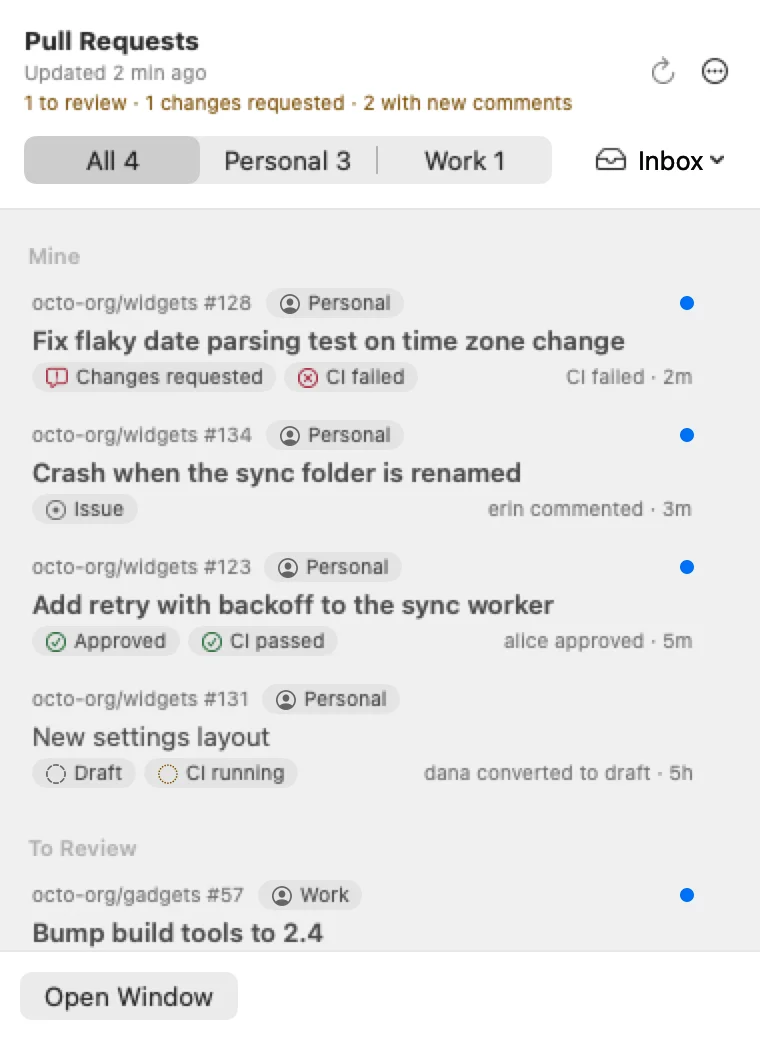
Pull requests that need you, counted in the menu bar.
Why PullPing
Every account, one inbox
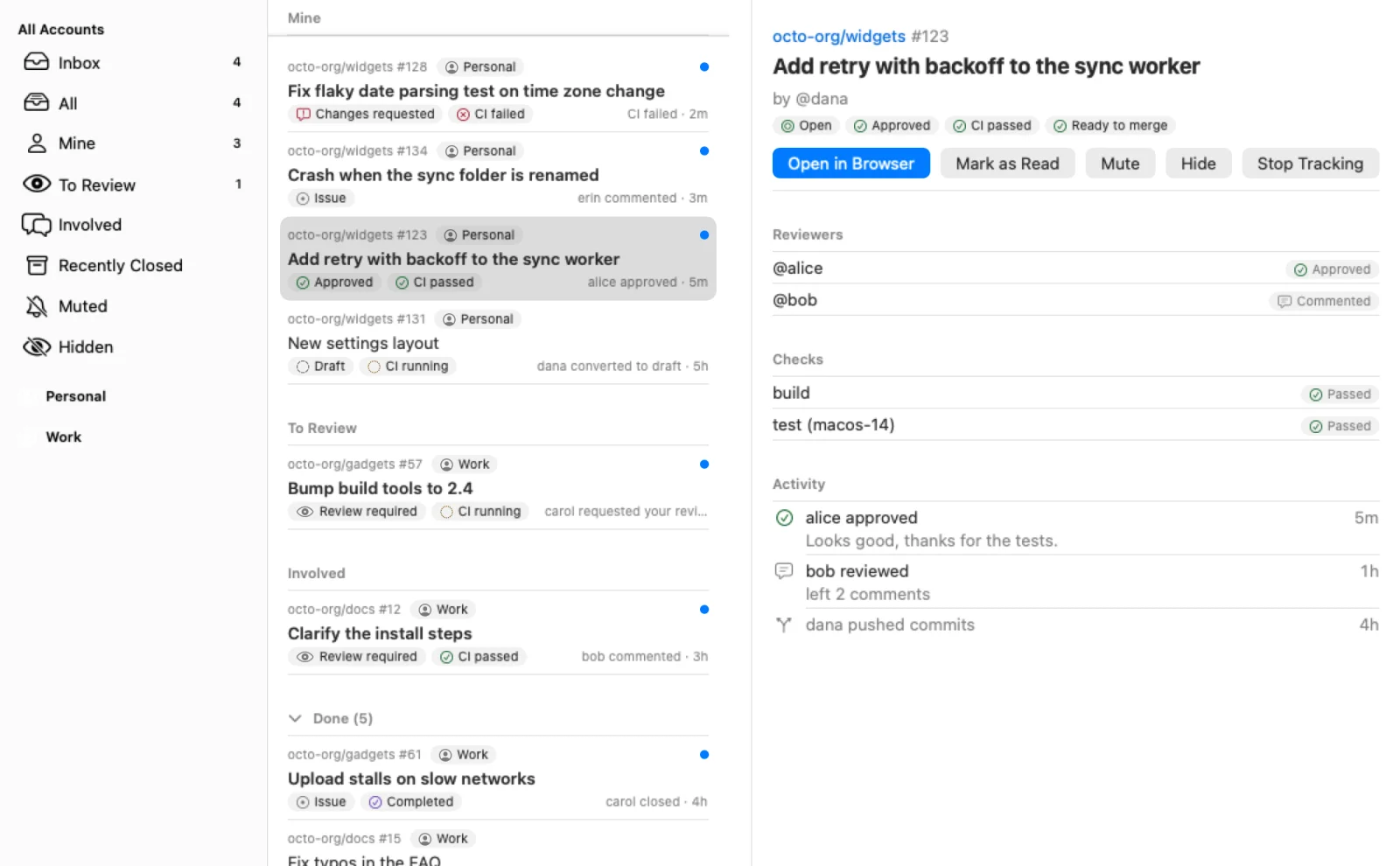
Personal and work, each with its own token. PullPing tracks every pull request you opened, are assigned to, were asked to review, commented on or were mentioned in, and the issues you opened, are assigned to, comment on or were mentioned in, marked with an Issue chip. See them all together, or one account at a time, in the menu-bar panel and in a Mail-style main window with filters for Mine, To Review, Involved, Recently Closed, Muted and Hidden.
A count that means something
The menu-bar number counts only what needs you: review requests, unread assignments and mentions, your own pull requests with changes requested, failed CI, new comments, or ready to merge, and new comments on your issues. The panel header spells it out, for example “1 to review · 1 changes requested”. Pick which reasons count, count everything unread, or show no number, in Settings. Lists put what needs you first; merged, closed and settled pull requests wait in a Done group.
Calm panels, and a nudge when it matters
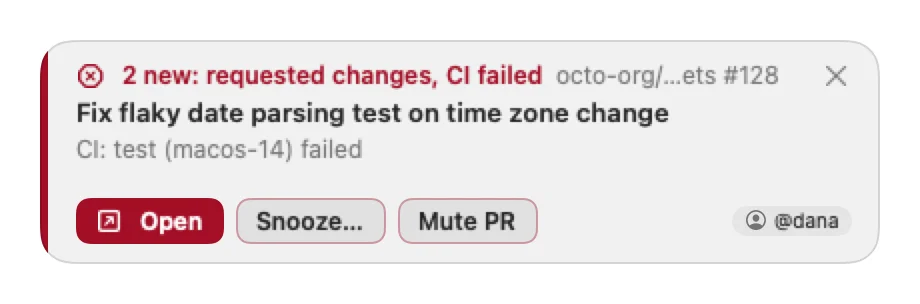
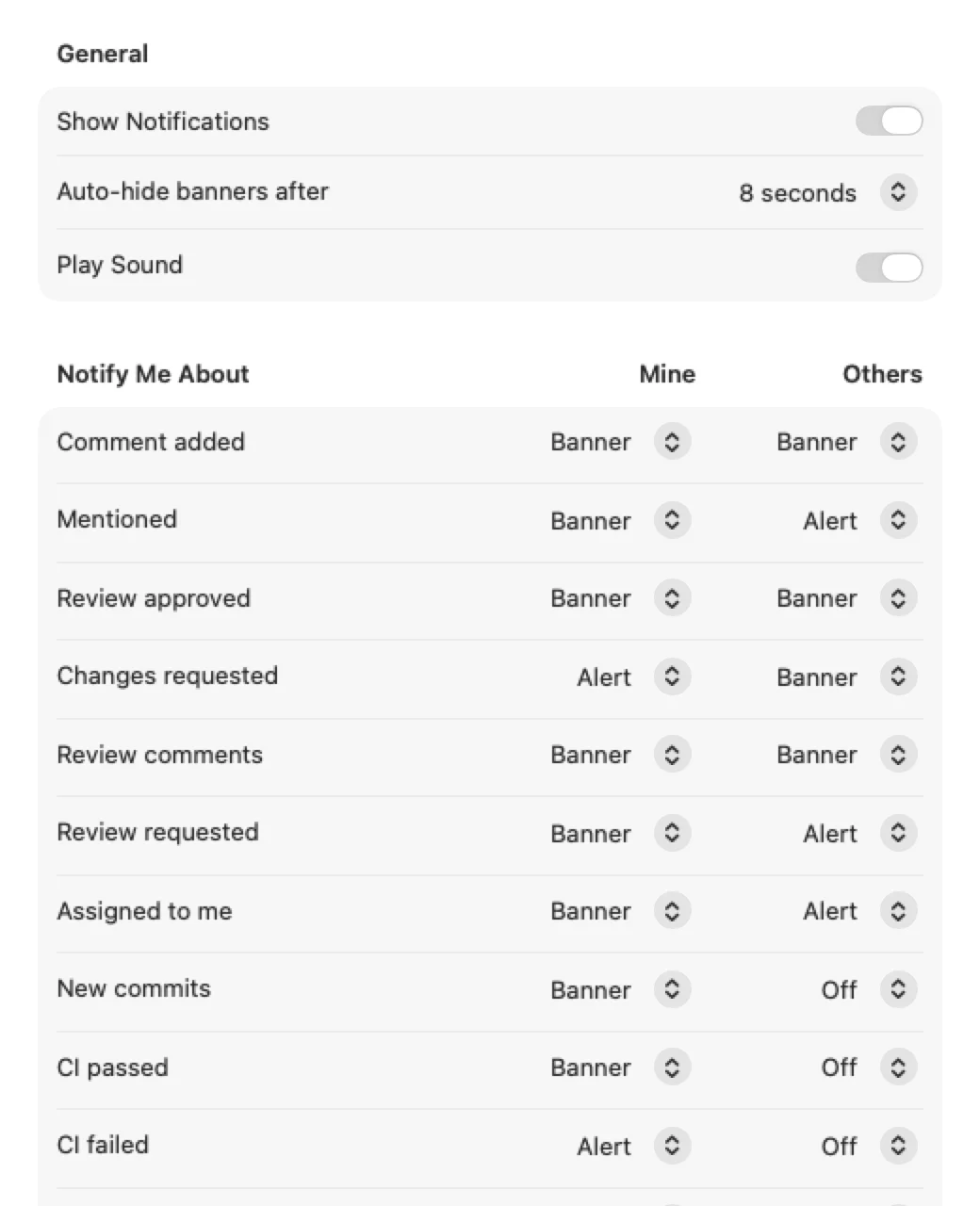
A small panel appears at the top right and never takes keyboard focus. For each kind of event, label changes included, pick Off, Banner (hides itself) or Alert (stays), separately for what you opened and for the rest. While your review is requested, PullPing reminds you again, every hour by default, until you review. Snooze, mute or hide any pull request or issue from the panel, the menu bar or the main window.
How it works
Every kind of event has its own style. These are the defaults.
The first sync of an account is silent: PullPing learns what already exists and only tells you about what happens afterwards, and issues you were already part of arrive the same way. Your own actions never notify you, and several events on one pull request merge into one panel. Mute keeps a pull request listed but silences it and leaves it out of the count. Hide removes it from every list and count, but it still notifies you.
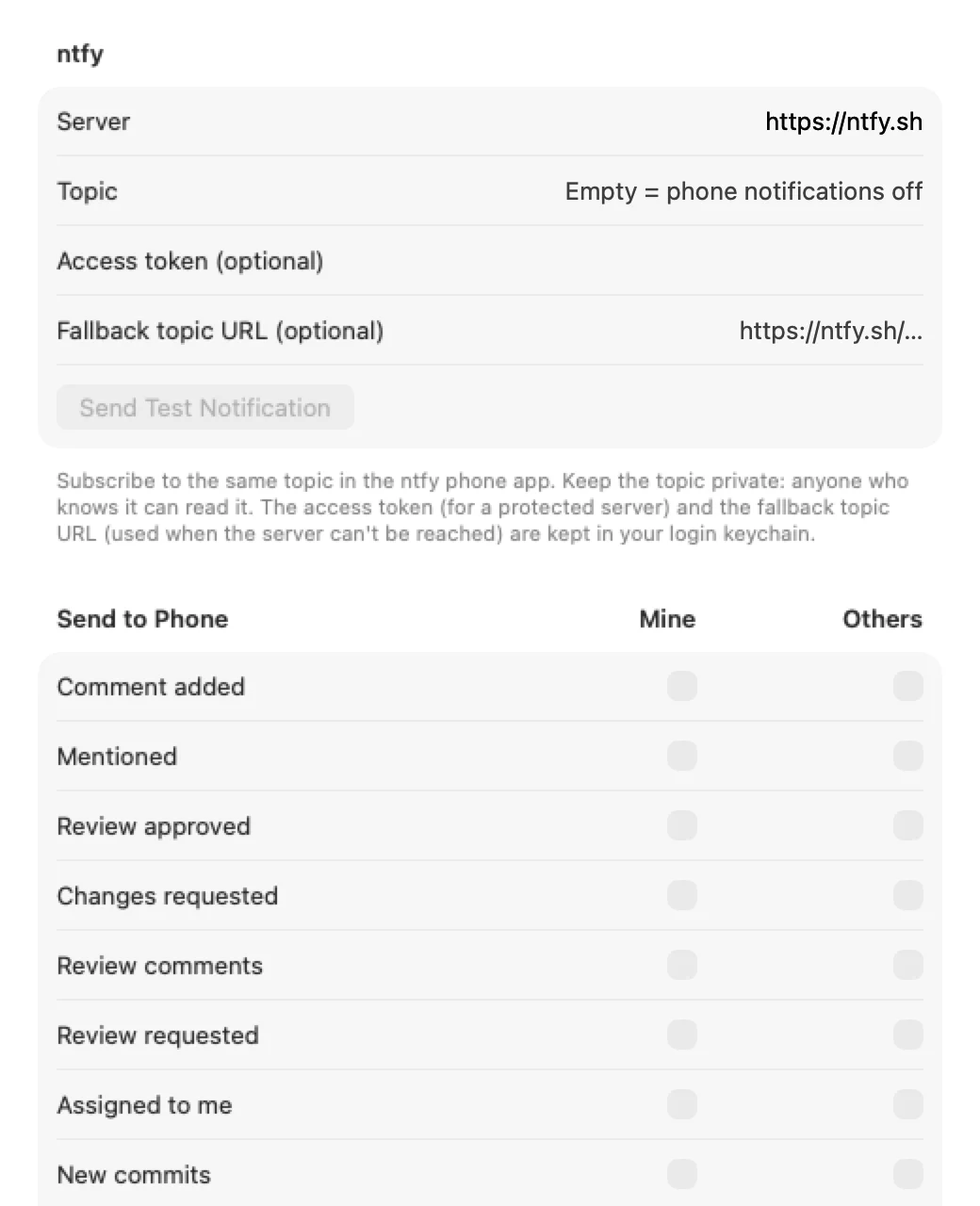
PullPing asks GitHub every 3 minutes by default (1 to 15 in Settings) and checks again right after your Mac wakes or the network returns, so an event can arrive up to one interval late. Away from the Mac, an optional phone push goes through ntfy: choose the kinds of event to send, separately from the desktop style. Nothing is sent until you tick one.
Honest limits: GitHub.com only, no Enterprise Server yet. macOS has no way to detect Focus, so panels appear during a Focus too; use Pause Notifications in the menu-bar icon's menu. CI status can be incomplete with fine-grained tokens, so use a classic token when CI matters.
The window and the settings
On every panel
- Open opens the pull request in your browser and marks it read.
- Snooze silences it for 15 minutes, 1 hour, 3 hours or until tomorrow 9:00.
- Mute PR (Mute Issue on an issue) keeps it listed but silences its panels and reminders.
- The close button dismisses just that panel. Every action also exists in the menu-bar panel and the menus, for keyboard and VoiceOver use.
Requirements
- macOS 14 or laterSonoma onwards.
- Apple Silicon and IntelOne universal download.
- A GitHub token per accountSign in with GitHub, or a classic personal access token with the
repoandread:orgscopes, or a fine-grained one. Tokens live in your login keychain and are sent only to GitHub. - No macOS permissionsNo Accessibility, no notification authorization, no Full Disk Access. A Welcome window offers Open at Login; PullPing never adds itself silently. No analytics.
First launch
PullPing is not notarized by Apple, which needs a paid developer account (it is ad-hoc signed). So macOS blocks the first launch with a "could not verify" message. Open System Settings > Privacy & Security, scroll down and click Open Anyway. Or clear the quarantine flag once:
xattr -dr com.apple.quarantine "/Applications/PullPing.app" After that it opens like any other app. If you would rather not trust a download, build it from source.
Questions
Which token do I need, and can PullPing change anything on GitHub?
A classic token with repo (or public_repo) and read:org is the simplest; organizations with SAML SSO also need the token authorized for each organization. Fine-grained tokens work with read access to pull requests, issues, commit statuses and checks, one token per organization. PullPing only reads: it never comments, reviews or merges.
Why did a notification arrive a few minutes late?
PullPing polls GitHub instead of receiving pushes, every 3 minutes by default. Refresh now (⌘R) checks immediately, at most once every 10 seconds, and it also checks after wake and when the network comes back.
What is the difference between Mute and Hide?
Mute keeps the pull request listed under Muted, silences its panels and reminders and leaves it out of the menu-bar count. Hide removes it from every list and count but it still notifies you. Stop Tracking removes it and ignores it from then on; Edit > Undo brings it back.
Does it track issues too?
Yes. Open issues you opened, are assigned to, are mentioned in or comment on sit next to your pull requests with an Issue chip. Comments, mentions, assignments, label changes, renames and closing notify like pull request events, and a closed issue shows Completed or Not planned. Settings, General, Track Issues turns them off.
What does a phone push contain?
The kind of event and repository, the pull request's title, who did what, and a short summary of the latest activity, sent only to your ntfy server (and an optional fallback topic you set). Keep the topic private: on a public server anyone who knows it can read it.
What's new
The latest changes in the changelog. Downloads and checksums: GitHub releases.
0.4.02026-10-30
Added
- Issues. Open issues you opened, are assigned to, are mentioned in or commented on are tracked next to your pull requests, with an Issue chip on their rows. Comments, mentions, assignments, renames, reopening and closing notify like pull request events; a closed issue shows Completed or Not planned. Settings → General → Track Issues turns them off and removes them from the lists. Issues you were already involved in arrive quietly, marked read.
- Label changes on pull requests and issues: a new Labels changed kind in Settings → Notifications and Phone (banner on yours, off for others by default).
- Assigned to me in Settings → General → Count in the Menu Bar: an unread assignment, on a pull request or an issue, counts toward the menu-bar number. New comments on an issue assigned to you count as new comments.
Changed
- The Notifications and Phone tables call their first column Mine: pull requests and issues you opened.
- Upgrade only: a 0.3.0 build cannot read state or settings written by this version (state moves to state.broken.json, settings reset).
0.3.02026-10-30
Changed
- Lists are sorted by what needs you: pull requests waiting on you first, then ones with unread activity, then the most recently active. The panel, the main window and every filter use the same order.
- Pull requests with nothing left for you move to a Done group at the bottom: merged or closed ones, and others' pull requests you're only involved in once everything is read and no review is asked of you or your team. In the panel Done is collapsed, like Hidden; in the main window it's a section you can collapse, and PullPing remembers your choice.
0.2.02026-10-30
Added
- The welcome window now says why PullPing exists and shows the app icon, a Ko-fi support box and a wider layout.
- Welcome Guide… in Settings → General → About reopens the welcome window.
0.1.22026-10-30
Added
- Settings → General → Count in the Menu Bar: choose which reasons count toward the menu-bar number. Review requests from your team now have their own switch and their own line in the panel header.
Changed
- Account names you set in Settings now show everywhere: the panel's account switch, row chips, notification panels, the main window sidebar, error lines and phone notifications ("Account: …").
- The panel's menu button is now ⋯ (More) instead of a gear, with the same items as the right-click menu, including Pause Notifications.
Fixed
- An empty "PullPing Settings" window could appear after closing Settings or reopening PullPing.
- The panel header no longer overflows and clips with long account names; the account switch becomes a menu when it doesn't fit.
0.1.12026-10-30
Added
- Sign in with GitHub: add an account by approving a short code on github.com (OAuth device flow), no personal access token needed. Organizations that restrict OAuth apps may need an owner to approve PullPing first.
Keep the next one coming
If PullPing saves you from a forgotten review, you can support its development. Optional, always appreciated.
I'm a software engineer from Israel who builds small, focused Mac tools to fix the little annoyances in my own day — then shares them free and open source. If this app saves you time, a coffee on Ko-fi keeps the next one coming. ☕
Roy Padina
Not today? A star on GitHub or a bug report helps too.
What a coffee pays for
- The Apple Developer Program, so the apps can be notarized and the "Open Anyway" step goes away.
- Evenings on bug reports, new macOS versions and Intel builds.
- The next small tool.