VaultBar
Your encrypted vaults, one click from the menu bar.
Lock and unlock AES-256 encrypted disk-image vaults. Auto-lock on sleep, screen lock or idle, read-only and hidden mounts, a panic hotkey, a CLI and a URL scheme. The password is never stored anywhere.
brew install --cask roypadina/tap/vaultbar Version 0.2.4, released 23 October 2026. macOS 14 or later, Apple Silicon and Intel. Free and MIT licensed.
Why VaultBar
Your password is never stored
Not in the Keychain, not on disk, not in the clipboard, not in a log or a process argument. It goes to macOS's own disk-image tools through a pipe, and a person types it every time. The command line and the URL scheme have no password parameter, on purpose.
It locks itself
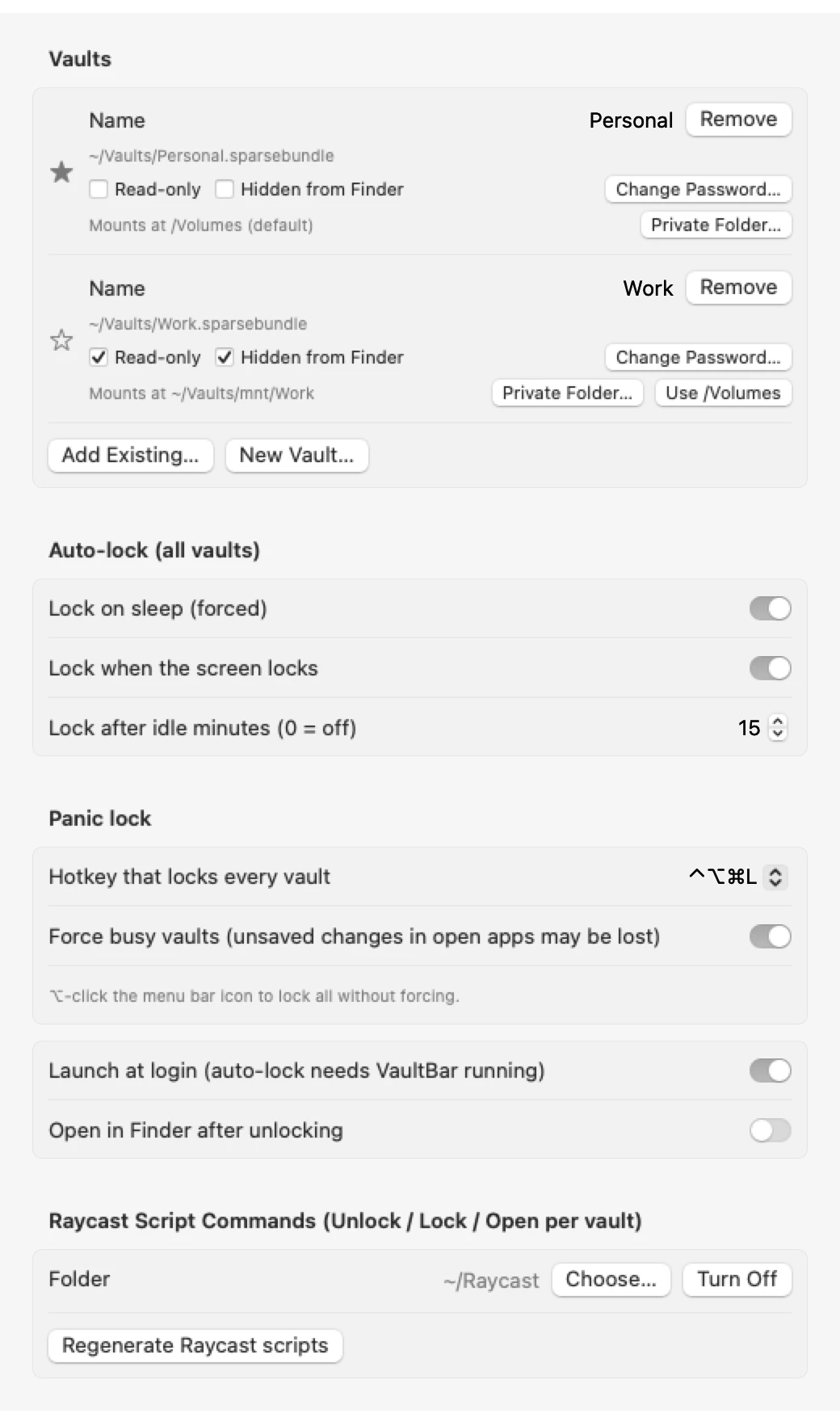
Sleep, screen lock or idle: the vault unmounts without you remembering to. A panic hotkey (⌃⌥⌘L by default, no Accessibility permission needed) locks every vault at once. Pause auto-lock for an hour when a long job needs the vault open.
One click, native, scriptable
A menu bar icon that shows locked, unlocked or paused, plus a
vaultbarcommand line,vaultbar://links and Raycast scripts. Built on macOS's own AES-256 APFS images: no kernel extension, no FUSE, no network.
How it works
A small front end for macOS's built-in encrypted disk images, not a new encryption product.
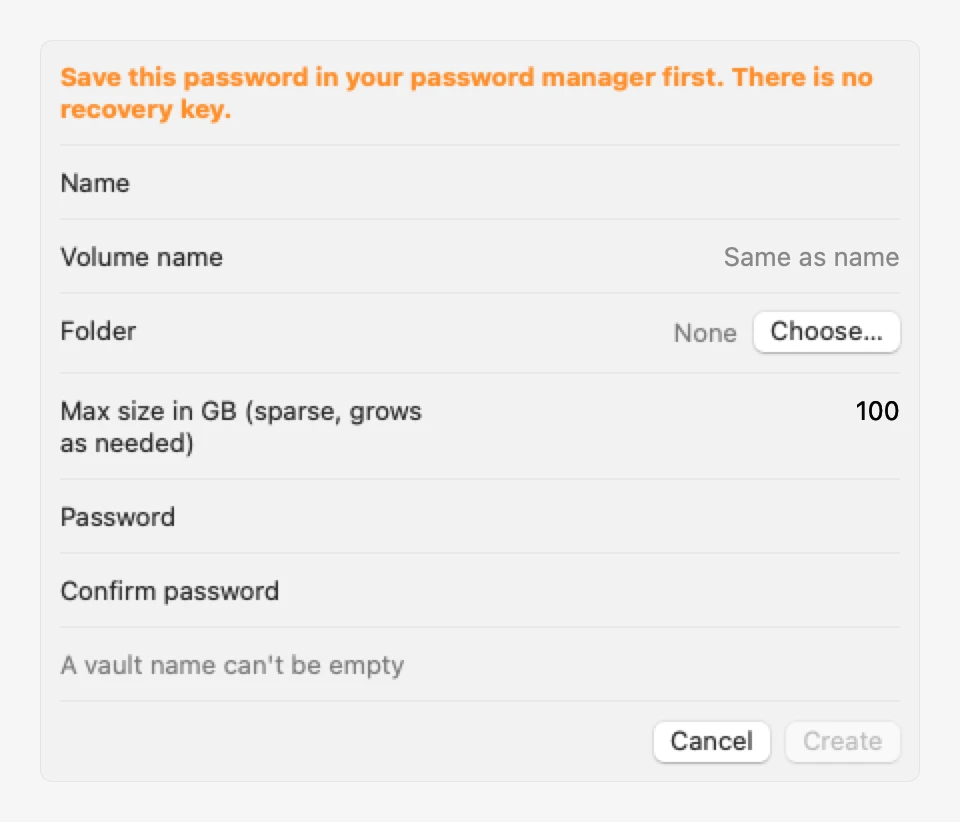
A vault is an encrypted AES-256 APFS sparse bundle, created by VaultBar or added from any encrypted .sparsebundle or .dmg you already have. New Vault warns about weak passwords and about folders that sync to a cloud, because a sparse bundle is many band files and two-way sync can corrupt it. Unlock read-only when a job only reads; give it a private mount path that never changes so scripts can rely on it.
The honest part: VaultBar keeps the vault itself locked, but macOS and your apps can keep traces of what you opened. QuickLook thumbnails, Recent Items, screenshots, clipboard managers and local AI apps all live outside the vault. The where plaintext can leak page lists each one and what to do about it.
VaultBar, Cryptomator and VeraCrypt
| VaultBar | Cryptomator | VeraCrypt | |
|---|---|---|---|
| Platforms | macOS only | macOS, Windows, Linux, iOS, Android | macOS, Windows, Linux |
| How it encrypts | macOS's own AES-256 APFS images | Its own per-file encryption | Its own volumes (macFUSE on a Mac) |
| Kernel extension or FUSE | None | FUSE-style mount | macFUSE |
| Auto-lock | Sleep, screen lock, idle | Idle and manual | Logoff, screen saver, inactivity |
| Panic hotkey, URL scheme, built-in CLI | Yes | No | CLI |
| Vault you can open on other systems | No | Yes | Yes |
| Hidden volumes | No | No | Yes |
| Independent security audits | No (thin wrapper, small open code) | Yes | Yes |
| Price | Free, MIT | Free desktop, paid mobile | Free |
Choose Cryptomator to sync encrypted files through a cloud or open the same vault elsewhere; VeraCrypt for hidden volumes; VaultBar if you only use a Mac and want the vault one click away with no extra drivers. From each project's public docs at the time of writing.
Settings and a new vault
Requirements
- macOS 14 or laterSonoma onwards.
- Apple Silicon and IntelOne universal download.
- No permissions to grantNo Accessibility, no Full Disk Access, no kernel extension. It runs macOS's own hdiutil and diskutil.
- No network connectionsOpen source under MIT. Encryption is macOS's; VaultBar is the front end.
First launch
VaultBar is not notarized by Apple, which needs a paid developer account (it is ad-hoc signed). So macOS blocks the first launch with a "could not verify" message. Open System Settings > Privacy & Security, scroll down and click Open Anyway. Or clear the quarantine flag once:
xattr -dr com.apple.quarantine "/Applications/VaultBar.app" After that it opens like any other app. If you would rather not trust a download, build it from source.
Questions
I lost the password. Can it be recovered?
No. There is no recovery key and no backdoor, by design. Save the password in your password manager when you create the vault; New Vault reminds you.
Does VaultBar store my password anywhere?
No. Not on disk, not in the Keychain, not in the config, logs, process arguments, environment or clipboard. The system's own disk-image password dialog, with its "remember in keychain" box, never appears.
Can I keep a vault in iCloud Drive or a synced folder?
Better not. A sparse bundle is many band files, sync tools upload them as they change, and two-way sync can corrupt the image. Keep it in a local folder and back it up while it is locked.
Can I use it with a local AI agent or a long job?
Yes. Idle counts keyboard and mouse only, so pause auto-lock for an hour from the menu, give the job a private mount path, and unlock read-only if it only reads. The job cannot unlock the vault itself: the command line never takes a password.
What if a vault is unlocked outside VaultBar?
The icon turns amber for any vault in your list however it was mounted, and auto-lock applies to it. Removing a vault from the list never deletes the image file.
Keep the next one coming
If VaultBar keeps your private files one click away and locked when you walk off, you can support its development. Optional, always appreciated.
I'm a software engineer from Israel who builds small, focused Mac tools to fix the little annoyances in my own day — then shares them free and open source. If this app saves you time, a coffee on Ko-fi keeps the next one coming. ☕
Roy Padina
Not today? A star on GitHub or a bug report helps too.
What a coffee pays for
- The Apple Developer Program, so the apps can be notarized and the "Open Anyway" step goes away.
- Evenings on bug reports, new macOS versions and Intel builds.
- The next small tool.