Window Organizer
Clear the desk in one keystroke.
Minimize, close, quit or force-quit every app and window at once, each action on its own global shortcut. Per-app rules, a current-Space or all-Spaces scope, and it skips Finder and menu-bar apps by default. Not an app switcher.
brew install --cask roypadina/tap/window-organizer Version 0.2.4, released 23 October 2026. macOS 14 or later, Apple Silicon and Intel. Free and MIT licensed.
Why Window Organizer
Four actions, four shortcuts
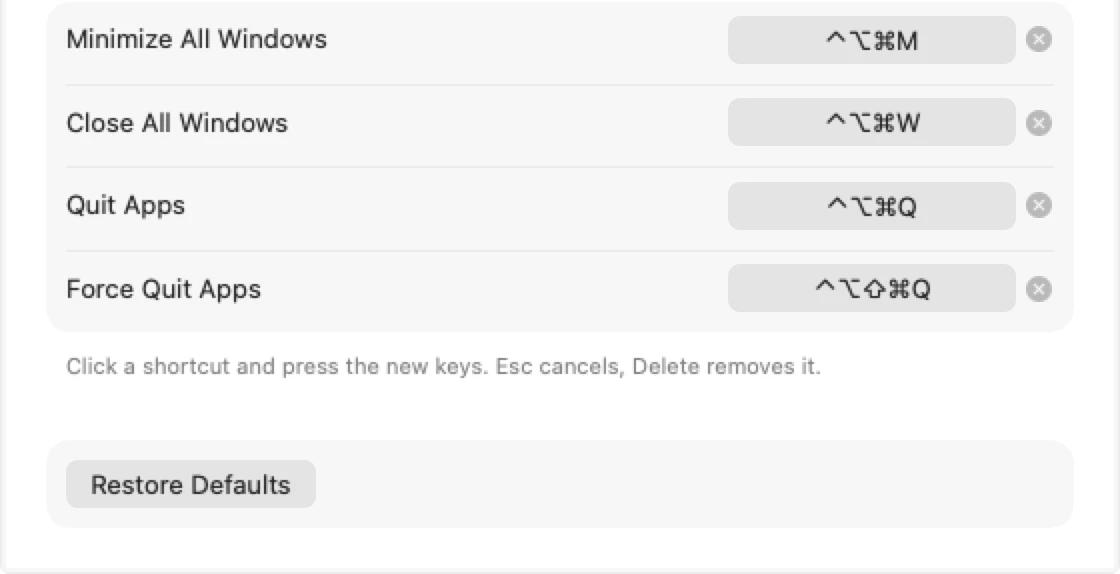
Minimize every window, close every window, quit every app, or force-quit every app. Each on its own global shortcut, recordable in Settings with a live preview and a warning when another app already owns the keys. The same actions sit in the menu bar menu.
It knows what to leave alone
Finder, the Dock, System Settings, menu-bar apps and background processes are skipped by default. Include or exclude any running app by hand; exclude always wins. Search the list and filter by kind, developer and status.
Nothing you did not ask for
Close presses each window's own close button and quit is a normal quit, so apps still show their save dialogs. Force quit always asks first. The current Space and displays by default, or all of them. No network, no analytics.
How it works
What each key does.
Minimize and close talk to other apps' windows through the macOS Accessibility API, so those two need the Accessibility permission; quit and force quit do not. Since 0.2.0 releases are signed with the same certificate, so the grant survives updates.
Honest limits: macOS has no public API for full Space-level window control, so the current-Space scope is best effort; minimize and close only reach windows apps expose through Accessibility; some system and protected processes cannot be quit. It is not an app switcher, and it has no CLI or URL scheme yet.
Settings
In Settings you can
- record any key combination for each of the four actions
- include or exclude any running app, with search and filters
- choose the scope: current Space and displays, or all
- grant Accessibility from the General tab
- launch at login
Requirements
- macOS 14 or laterSonoma onwards.
- Apple Silicon and IntelOne universal download, a few hundred kilobytes.
- Accessibility, for minimize and closeQuit and force quit work without it. Grant it from Settings > General.
- No network, no analyticsPreferences stay in a local defaults domain. Open source under MIT.
First launch
Window Organizer is not notarized by Apple, which needs a paid developer account (it is ad-hoc signed). So macOS blocks the first launch with a "could not verify" message. Open System Settings > Privacy & Security, scroll down and click Open Anyway. Or clear the quarantine flag once:
xattr -dr com.apple.quarantine "/Applications/Window Organizer.app" After that it opens like any other app. If you would rather not trust a download, build it from source.
Questions
Will it lose my unsaved work?
Minimize, close and quit: no. Close presses the window's own close button and quit is a normal quit, so apps show their usual save dialogs. Force quit can, which is why it always asks for confirmation first.
Which apps are targeted?
Regular apps with a Dock icon, except Window Organizer itself, Finder, the Dock, System Settings, Control Center, Notification Center and other system pieces, and background or menu-bar-only apps. Change it per app under Settings > Apps.
Is it an app switcher?
No. No thumbnails, no search, no focusing windows. It only minimizes, closes, quits or force quits, in bulk.
Does it work across Spaces and displays?
The default scope is the current Space and displays. "All Spaces and displays" goes further, but macOS has no public API for full Space control, so treat it as best effort.
Can I automate it?
Not yet: there is no URL scheme or CLI. Open a feature request if you need one.
Keep the next one coming
If Window Organizer clears your desk every evening, you can support its development. Optional, always appreciated.
I'm a software engineer from Israel who builds small, focused Mac tools to fix the little annoyances in my own day — then shares them free and open source. If this app saves you time, a coffee on Ko-fi keeps the next one coming. ☕
Roy Padina
Not today? A star on GitHub or a bug report helps too.
What a coffee pays for
- The Apple Developer Program, so the apps can be notarized and the "Open Anyway" step goes away.
- Evenings on bug reports, new macOS versions and Intel builds.
- The next small tool.